



You probably wonder if native 1080p or supported 4K is the better pick for your projector. Most people choose 1080p, which held 38.7% of the market in 2025, while supported 4K only reached 14.8%. You should know what native 4K resolution really means and how projector resolution affects image clarity. Think about your screen size, the type of content you watch, and your budget. The right choice depends on your viewing habits and what looks best to your eyes.
Key Takeaways
Native 1080p projectors give clear pictures. They cost less money. They work well for small screens. They are good for daily use.
Supported 4K projectors show sharper pictures. They have better color accuracy. They work best on big screens. They make watching more enjoyable.
Look at your screen size and how far you sit. 4K is better for screens over 100 inches. It helps when you sit close to the screen.
Think about what you watch. 4K is great for movies and games. 1080p is good for regular HD shows and old movies.
Check your budget. 1080p projectors usually cost less. 4K projectors have more features but cost more.
Native 1080P And Supported 4K Explained
What Is Native 1080P?
1080p is a common choice for home projectors. Native 1080p means the projector’s panel really has 1920x1080 pixels. This is not just a fancy word. The projector shows each pixel from your video without tricks. You see a clear and sharp picture, especially on screens with a 16:9 shape. Here is a simple table about native 1080p:
Resolution |
Pixel Dimensions |
Aspect Ratio |
|---|---|---|
1080p |
1920x1080 pixels |
16:9 |
A native 1080p projector gives you the detail you want from HD videos.
What Does Supported 4K Mean?
Supported 4k can be tricky to understand. Many projectors say they are 4k or UHD, but most do not have a real 4k panel. Most supported 4k projectors use pixel-shifting. This means the projector takes a 4k signal and moves pixels fast to look like higher resolution. You see more detail than 1080p, but it is not true 4k. Here is how brands make supported 4k:
Companies like Optoma, BenQ, and Dell use pixel-shifting in their 4k UHD projectors.
Pixel-shifting uses real 4k data by overlapping pixels, making the picture look sharper than 1080p.
True 4k projectors, like Sony’s, use panels with real 4k resolution for the best detail.
Many people think all 4k projectors are equal. You should check if the projector is native 4k or just supported 4k. Look for words like 4k UHD, 4k Enhancement, XPR, or e-shift. These usually mean the projector uses pixel-shifting, not a real 4k panel.
Why Resolution Matters
Resolution changes how sharp and clear your movies and games look. Higher resolution, like 4k, gives you more pixels on the screen. This means you see smaller details, better colors, and sharper lines. For example, a 4k UHD projector like the XGIMI AURA, with 3840 x 2160 pixels, shows how much clearer pictures can be with more pixels. You notice this most on big screens or when you sit close.
You get sharper lines.
Small details pop out, making your viewing more real.
Many buyers do not understand supported 4k. They may think all 4k projectors give the same quality, but only true 4k projectors show every detail. You should always check the specs and know what you are getting. Picking the right resolution helps you get the best picture and value for your needs.
4K vs 1080P Image Quality
Sharpness And Detail
You want your movies and games to look sharp and lifelike. The difference between 4k and 1080p becomes clear when you compare them side by side. A 4k projector gives you a much sharper image than a 1080p projector. You see fine details, like the texture of clothing or the lines in a city skyline, with more clarity. Small text looks crisp and easy to read on a 4k screen. On a 1080p projector, you might notice pixelation or blurry edges, especially if you use a large screen. This matters most when you watch high-quality movies or play games with lots of detail. If you want cinematic clarity, 4k makes a big difference.
Color And Contrast
Color and contrast help create a cinematic experience. You want colors to look rich and blacks to look deep. Projectors with 4k support often have better color accuracy and higher contrast ratios than basic 1080p models. This means you see brighter highlights and darker shadows, which makes the image pop. Look at this table to compare some popular models:
Projector Model |
Native Contrast Ratio |
Dynamic Contrast Ratio |
Color Accuracy (ANSI Lumens) |
|---|---|---|---|
LX700-4K |
1800:1 |
5000:1 |
1950 |
BENQ X500i |
1550:1 |
3000:1 |
1950 |
BENQ X3100i |
900:1 |
1530:1 |
2000 |
Nexigo Aurora Pro |
N/A |
6000:1 |
2700 |
Epson LS11000 |
2000:1 |
5000:1 |
2401 |
You can also see the differences in this chart:
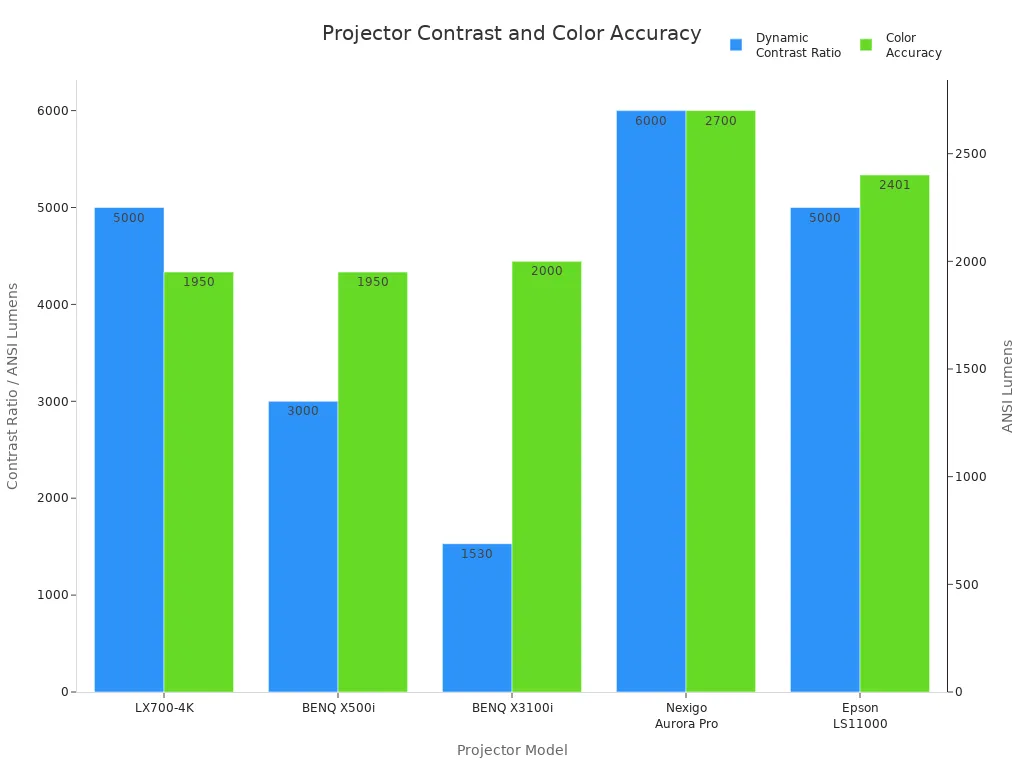
When you watch 4k content with hdr, you notice brighter colors and more lifelike images. Netflix hdr movies look stunning on a good 4k projector. If you care about hdr performance, you should look for a projector with high contrast and strong color accuracy.
When Supported 4K Performs Well
Supported 4k projectors work well for many home theaters. If you want to watch 4k content on a big screen, you get a more cinematic image than with 1080p. You see more detail in action scenes and animated films. Supported 4k projectors also handle hdr content better, so you enjoy brighter highlights and deeper blacks. You get a great experience when you stream high-quality movies or play games in 4k. If you sit close to the screen, you notice the extra detail and sharpness. For most living rooms, supported 4k gives you a real upgrade in image quality.
Tip: If you want the best cinematic experience, use a supported 4k projector with a screen size over 100 inches and watch 4k content with hdr.
When Native 1080P Is Better
Native 1080p projectors still give you a strong cinematic experience. If you watch mostly 1080p content, like cable TV or older movies, you do not need 4k. You get a clear image on screens up to 100 inches. Native 1080p projectors cost less and work well in smaller rooms. You do not always see a big difference between 4k and 1080p on smaller screens or from far away. If you want good quality for less money, native 1080p is a smart choice. You still enjoy hdr movies, but you do not pay extra for features you may not use.
Note: Choose native 1080p if you want a budget-friendly projector for everyday content and do not plan to upgrade to 4k content soon.
You should think about your room size, the type of content you watch, and how close you sit to the screen. The 4k vs 1080p debate depends on what matters most to you—cinematic clarity, hdr performance, or value for your money.
Viewing Factors For 4K And 1080P
Screen Size Impact
You should think about your screen size before choosing a projector. On screens smaller than 100 inches, your eyes cannot see much difference between 4k and 1080p at normal distances. The extra detail from a 4k projector does not stand out on a small display. When your screen grows larger, the story changes. If you use a screen over 120 inches, a 4k projector shows much clearer images than a 1080p projector. You can see the difference even if you sit as far as 15 feet away. Bigger screens make the higher resolution of 4k easy to notice.
Seating Distance
How close you sit to your projector screen also matters. If you sit far away, your eyes cannot pick out the extra pixels from a 4k projector. When you move closer, the sharpness of 4k becomes clear. You can use this table to find the best distance for each resolution:
Resolution |
Optimal Viewing Distance (in picture heights) |
|---|---|
1080P |
3.2 H |
4K |
1.6 H |
If you want the best experience, sit closer to your 4k projector screen than you would with a 1080p projector. This way, you see all the fine details that 4k offers.
Content Type Considerations
The type of content you watch changes how much you benefit from your projector’s resolution. Movies look more lifelike on a 4k projector because it shows over 8 million pixels. Sports fans enjoy smoother action and clearer images with 4k, especially during fast plays. If you love gaming, a 4k projector makes single-player adventure games feel real. You see every texture and distant object in the game world. A 1080p projector still works well for TV shows, cartoons, and older movies. You should match your projector choice to the content you enjoy most.
Tip: For the most immersive experience, use a 4k projector with a large screen and sit close enough to see the extra detail.
Price And Value Comparison
Cost Differences
There is a big price difference between 1080p and 4k projectors. Most 1080p projectors cost less than $500. These are good for watching movies, playing games, and sports. If you want a 4k projector, you will pay more money. The cheapest 4k projectors start at about $700. The best 4k projectors can cost thousands of dollars. Prices go up if you want extra features like more brightness or smart TV options.
Projector Model |
Price |
Brightness |
Native Resolution |
HDR Support |
Special Features |
|---|---|---|---|---|---|
Hisense PX3-PRO |
N/A |
3000 ANSI lumens |
3840 x 2160 |
Dolby Vision, HDR10+, HLG |
Google TV, Designed for Xbox |
LG CINEBEAM HU710PW |
$2,499 |
2181 ANSI lumens |
3840 x 2160 |
N/A |
Smart features, voice control |
LG AU810PB CINEBEAM |
$3,999 |
2700 lumens |
3840 x 2160 |
N/A |
Laser-light source, 20,000 hours lamp |
What You Get For Your Money
A 1080p projector gives you a clear picture and a lamp that lasts a long time. Many 1080p projectors use laser technology. This saves energy and cuts down on maintenance. If you buy a 4k projector, you get sharper pictures and better colors. Some 4k projectors have smart features, voice control, and HDR support. The best projectors have brighter lamps and last longer. High-end 4k projectors may have Dolby Vision or gaming features.
Tip: Choose a 4k projector if you want smart features or HDR. Pick a 1080p projector if you want good performance for less money.
Long-Term Value
Think about how much you will spend over time. 1080p projectors can last up to 30,000 hours. They use less energy and cost less to maintain. 4k projectors use energy-saving technology and last about 20,000 hours. Both types help you save money and reduce waste.
Projector Type |
Energy Efficiency |
Lamp Life |
Total Cost of Ownership |
|---|---|---|---|
4K Projector |
Energy-efficient |
20,000 hours |
|
1080p Projector |
Advanced laser tech |
Up to 30,000 hrs |
Reduced energy and maintenance |
Pick a projector that fits what you need. If you want the newest features and sharpest pictures, go with 4k. If you want something reliable and affordable, 1080p projectors are a great choice.
1080P vs 4K: Which To Choose?
Who Should Pick Native 1080P
You should pick a native 1080p projector if you want a clear picture and a good value. If you have a smaller screen, usually under 100 inches, you will not see much difference between 1080p and 4k. You can save money and still enjoy movies, sports, and games. If you watch mostly streaming shows or standard HD content, a 1080p projector gives you a sharp image. You do not need to spend extra for features you may not use.
If you have a tight budget, you can find many good 1080p projectors. For example, the EZCast Beam H3 costs about $119 and gives you a high-quality image, Wi-Fi, and a long-lasting LED lamp. You can set it up in a bedroom, living room, or even take it outside for movie nights. If you want something even more affordable, the EZCast Beam V3 is a good choice for art projects or casual viewing.
Here is a quick guide to help you decide:
Factor |
1080p Considerations |
|---|---|
Screen Size |
Under 100 inches |
Content Type |
Streaming, HD movies, TV shows |
Budget |
Lower cost, more options |
Viewing Environment |
Smaller rooms, less need for total darkness |
Tip: If you want a reliable projector for everyday use and do not plan to upgrade your content soon, native 1080p is the smart pick.
Who Benefits From Supported 4K
You benefit from supported 4k if you want the sharpest image and a true cinematic home theater experience. If you use a screen over 100 inches, you will notice the extra detail and clarity. Supported 4k projectors work best when you watch a lot of native 4k content, like Blu-ray movies or 4k streaming. You get brighter colors, deeper blacks, and more lifelike images. If you sit close to a large screen, you will see the difference right away.
You should also consider supported 4k if you want to future-proof your setup. Many new movies and games come in 4k. If you want to enjoy every detail, a supported 4k projector is the way to go. You may pay more, but you get a better experience, especially for big movie nights or gaming sessions.
Here is a table to help you see when supported 4k is the better choice:
Factor |
4K Considerations |
|---|---|
Screen Size |
Over 100 inches |
Content Type |
Lots of native 4k content, HDR movies, gaming |
Budget |
Willing to invest more for better quality |
Viewing Environment |
Large rooms, closer seating, darker spaces |
Note: If you want the best picture and plan to watch a lot of 4k content, supported 4k gives you a real upgrade.
Practical Scenarios
You can use these real-life scenarios to help you choose between 1080p vs 4k:
You have a small living room with a 90-inch screen. You watch Netflix, YouTube, and sports. You want to spend less than $300. In this case, a native 1080p projector gives you a great experience.
You set up a home theater with a 120-inch screen. You love watching 4k Blu-ray movies and want every detail to stand out. You sit about 10 feet from the screen. A supported 4k projector will give you a much sharper and more immersive experience.
You host outdoor movie nights with friends. Your screen is 80 inches, and you stream movies from your phone. You want something portable and easy to use. A 1080p projector is the best fit.
You are a gamer who wants to play on a 150-inch screen. You want to see every texture and detail in your games. You sit close to the screen for the best view. Supported 4k will make your games look stunning.
Here is a table that compares how each type performs in different situations:
Feature |
4K Projectors |
1080P Projectors |
|---|---|---|
Screen Size |
Best for screens above 100 inches |
Good for smaller screens |
Immersion |
More immersive, stunning clarity |
Less immersive on large screens |
Detail Visibility |
Fine details stay sharp at close distances |
Details may look soft or pixelated on big screens |
Remember: The 1080p vs 4k choice depends on your room, your screen, and what you want to watch. You get the best experience when you match your projector to your needs.
You should think about your budget, your space, and the kind of content you love. If you want a simple setup for everyday use, 1080p is enough. If you want the ultimate movie or gaming experience, and you have a big screen, supported 4k is worth it.
You need to pick a projector that fits your needs and budget. Most people think native 1080p projectors are a good deal for daily use. Supported 4K projectors show sharper pictures on big screens and help you get ready for the future.
Native 4K gives the clearest picture for fancy home theaters.
1080p with 4K support is good for watching shows and movies.
Strengths |
Weaknesses |
|---|---|
Bright and sharp pictures |
Might not have deep black colors |
Simple to set up and move |
Has fewer special features |
You should look at your screen size, what you watch, and your budget. Each type is better for different needs and situations.
FAQ
What does “native resolution” mean for a projector?
Native resolution means the projector’s display panel has a fixed number of pixels. You see the sharpest image when you match your video’s resolution to the projector’s native resolution.
Can you see a difference between 1080p and 4K on a small screen?
You usually cannot see much difference on screens under 100 inches. Your eyes notice more detail with 4K only on larger screens or when you sit close.
Is supported 4K the same as true 4K?
No, supported 4K uses pixel-shifting to mimic 4K detail. True 4K projectors have real 4K panels. You get the sharpest image with true 4K, but supported 4K still looks better than 1080p.
Do you need special cables for 4K projectors?
Yes, you need high-speed HDMI cables for 4K content. Regular HDMI cables may not support the higher data rates needed for 4K video.
Will a 1080p projector play 4K movies?
Yes, a 1080p projector can play 4K movies, but it will downscale the video to 1080p. You will not see the extra detail from the original 4K source.